Review Comments (0) Screenshots (5) Questions & Answers (0) Votes (1) Awards (13) Wiki  
(1)
SoftOrbits Inc
4.0
www.softorbits.com
Shareware
$9.36  Purchase
514 people
Download Batch Picture...

2.4 MBDownloaded 2721 times

This software was checked for viruses and was found to contain no viruses.
Click here to see antivirus report.
 
Video tutorial for Batch Picture Resizer 4.0
Frame
Video tutorial for Batch Picture Resizer 2.4
Frame
This video tutorial has been acquired from Downloadtube.com

Review

This is official description

Why would you need a batch picture resizer? Well, there are some innocent folk out there, who waste their time to watermark, convert or resize pictures one-by-one. After spending hours carrying out such simple tasks, they then complain how difficult it is to use Photoshop even for the easiest of conversion jobs... Jobs that a simple batch picture resizer could do in minutes. Now there is no excuse for such complaints - Batch Picture Resizer is software specifically designed for fast and simple automation of such tasks as image resizing, conversion and watermarking.
 
The following review written by one of the Software Informer contributors applies to version 2.4

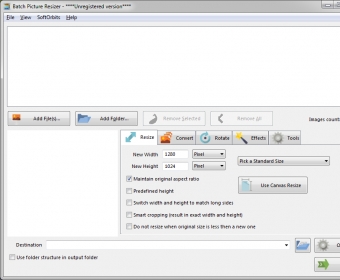
Batch Picture Resizer is an extraordinary but easy-to-use image resizing and watermarking application. The tool has been designed with a purpose to help the user in image resizing process. Even this is the perfect option for photo resizing, watermarking and converting tasks. Batch Picture Resizer includes all the powerful functionality and helps the user to share edited pictures with friends, to publish them on the web. The tool allows you to resize single or group of photos in one process, use image watermarking options, rotate and auto rotate images without compromising in quality, use canvas resize feature, rename image files in batch mode so on. Moreover, you can process number of popular image formats like JPG, BMP, RAW, TIFF, GIF, PNG, PCX, PCX and many more. Further rotate images by percent and pixel, maintain original aspect ratio, change DPI of the images, make photos more vibrant, convert images to grayscale, and change transparency levels etc. It can overwrite the files with the new size; keep all the resized photos in a separate file. With much more features, the tool is just amazing.
  • Share resized photos with friends via e-mail, publish them on the web.
  • Support multiple image formats.
  • None found.

Reviewed by: Venugopal Naidu

Reviewer rating:

Reviewed: 3 years ago

What's new in version 4.0

• Windows Explorer context menu integration
• Auto updating
• Windows x64 support

What's new in version 2.1

- Context menu integration to MS Windows Explorer
- Now it saves destination folder, width and height on exit
- Fixed problem with transparent GIFs
- Spanish language added
Report a wrong version Report a wrong program title Suggest a correction

Screenshots

Main window Main window Main Screen Main Screen Options Options Watermarks Watermarks
All 5 screenshots

Latest comments


There are no comments, be the first one!
Add new comment

E-mail Address:

Password:

Register now »

Forgot password?

Sign in with:
Download Software Informer Client
Copyright © 2012, Informer Technologies, Inc. About| Privacy and terms| Help| Feedback & Support| Partners program